

Controlling a Stage
The purpose of the Controlling a Stage process (CS) is to assign work appropriately, monitor its status, address issues, report progress to the Project Board, and take corrective action to keep the stage within its agreed tolerances.
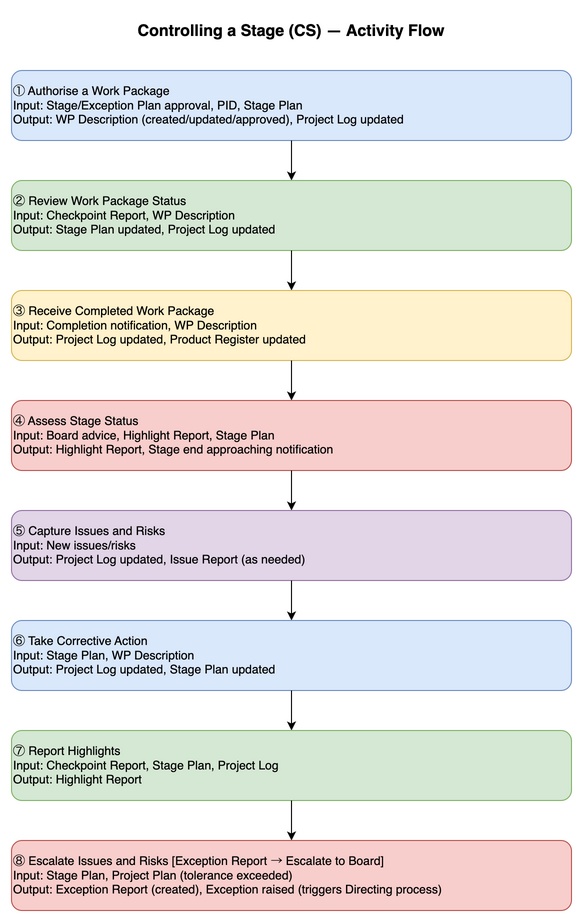
Objectives
The PM, as a facilitator, ensures the following.
- Control delivery: Monitor deviations from the products agreed at stage start; prevent uncontrolled changes
- Manage risks and issues: Stay up to date at all times and keep them under control
- Maintain justification: Continuously review the Business Case
- Ensure quality: Confirm that products meet expected quality and will be accepted
- Respect tolerances: Work to deliver within established tolerances (time, cost, etc.)
Context
Stage Management Cycle
The following activities are performed as a cycle throughout the stage.
- Authorise work: Define work using Work Package (WP) Descriptions and assign to teams
- Monitor: Collect WP progress information (checkpoint reports, etc.) and accept completed products
- Review status: Confirm status and quality; trigger the next WP
- Report highlights: Report progress to the Project Board at the agreed frequency
- Capture and assess issues and risks: Observe newly arising risks and issues; respond appropriately
- Take corrective action: Take measures to regain control when the situation is forecast to deviate from tolerances
Key Implementation Points
- When applied: Normally begins with the first delivery stage after project authorisation, but is also applied in the initiation stage for large or complex projects
- Using Work Packages: Even when the PM is also acting as Team Manager, use WP Descriptions for directing and controlling individual members to clarify responsibilities and authority
- Process transitions
- As each stage approaches its end, triggers the Managing a Stage Boundary (SB) process
- Near the end of the final stage, triggers the Closing a Project (CP) process
Activities
| Input | Activity | Output |
|---|---|---|
| Stage authorisation (trigger) Exception Plan authorisation (trigger) Project Initiation Documentation (review) Team Plan (review) Stage Plan (review) | Authorise a Work Package | Project Log (updated) WP Description (created/revised/approved) WP authorisation (triggers Managing Product Delivery) |
| New issue or risk (trigger) WP Description (review) Team Plan (review) Checkpoint Report (review) | Assess the Work Package Status | Project Log (updated) Stage Plan (updated) Issue Report (created as needed) Request for advice (triggers DP) |
| Same as above | Capture and Assess Issues and Risks | Project Log (updated) Stage Plan (updated) Issue Report (created as needed) Request for advice (triggers DP) |
| Same as above | Take Corrective Action | Project Log (updated) Stage Plan (updated) Issue Report (created as needed) |
| Notification of WP completion (trigger) WP Description (review) | Receive a Completed Work Package | Project Log (updated) |
| Project Board advice (trigger) Previous Highlight Report (review) Stage Plan (review) Checkpoint Reports (review) Project Log (review) | Assess the Stage Status | Project Log (updated) Highlight Report (created each period) Approaching end of stage (triggers SB) Approaching end of project (triggers DP) |
| Same as above | Report Highlights | Project Log (updated) Highlight Report (created each period) |
| Stage Plan (review) Project Plan (review) | Escalate Issues and Risks | Exception Report (created) Exception raised (triggers DP) |
Activity Details
Authorise a Work Package
This activity balances autonomy in project work with overall schedule coordination. It prevents confusion from work beginning without the PM’s agreement and ensures reliable execution based on the plan.
4 triggers for authorising a WP:
- Stage authorisation: The Project Board has granted authority to execute the Stage Plan
- Exception Plan approval: An exception has occurred and the new plan (Exception Plan) has been approved for execution
- New WP needed: The current progress assessment has identified the next piece of work to begin
- Corrective action: New work is needed to address an identified issue or risk
Recommended actions for the PM:
- Identify and define WPs: Review the PID and Stage Plan to identify and define the necessary WPs
- Co-create and authorise: Review the WP Description together with the Team Manager; confirm acceptance of content; then authorise the start of work
- Synchronise plans: Review the Team Plan and reflect the WP schedule in the Stage Plan
- Ensure quality arrangements: Consult with Project Assurance to confirm that the right people are assigned to quality reviews
- Update the log: Reflect authorised WP content and planned quality management activities in the Project Log
Assess the Work Package Status
Regularly understand the progress of WPs in progress and assess whether there are deviations from the plan.
Recommended actions for the PM:
- Informal communication: Interact with Team Managers on a day-to-day basis to detect potential issues and risks not reflected in formal reports as early as possible
- Review Checkpoint Reports: Accurately understand actual progress and future forecasts
- Keep the Project Log current: Update the Risk Register, Issue Register, and other Project Log components as needed based on collected information
- Update the Stage Plan: Keep the Stage Plan up to date by reflecting actual figures and future forecasts
Receive a Completed Work Package
The final confirmation that all work assigned to an individual or team has been completed and formally approved.
Recommended actions for the PM:
- Confirm work completion: Confirm that all work defined in the WP Description has been completed (or, for agile, that the agreed features within the timebox have been delivered)
- Check quality activities: Cross-reference the Quality Register to determine whether all planned quality reviews and inspections have been completed
- Confirm formal approval: Ensure that each product has received formal approval from the appropriate authority in accordance with the Product Description
- Update the Product Register: Reflect the status of approved products in the Product Register
- Record actual performance in the Stage Plan: Update the Stage Plan to record that the WP has been formally completed
Assess the Stage Status
Compare what actually happened (actuals) with what was expected to happen (plan) and analyse what might happen next to maintain stage control.
Assessment dimensions:
- Actuals vs Plan: Work completed to date and resources consumed
- Forecast: Projected values at stage end; whether tolerances are likely to be exceeded
- Additional information: Newly identified risks, issues, and their impact on the Business Case
Recommended actions for the PM:
- Review progress: Review stage progress and determine whether corrective action is needed
- Keep log and plan current: Revise the Project Log as needed; update the Stage Plan when there are changes to forecasts
- Confirm product transfer: When products are planned to be transferred progressively to users, confirm that ownership is being appropriately transferred
- Reflect on lessons: Consider whether to conduct a lessons review now or wait until the stage end
- Prepare for the next phase: Begin preparations for SB when approaching stage end, or CP when in the final stage
Capture and Assess Issues and Risks
An activity to identify and evaluate issues and risks that arise unpredictably during project execution in a consistent and reliable way.
- Comprehensive capture: Collect without missing any information raised through any route — business, project, stakeholders
- Psychological safety: It is essential to foster a culture in which the team can share issues and risks promptly without concealing them
- Swift action: Before deciding on a specific response, always follow these steps:
- Register: Record the event in the Project Log (Risk Register or Issue Register)
- Impact assessment: Analyse the impact of the event on project tolerances and the Business Case
Recommended actions for the PM:
- Respond to risks: When a new risk is identified, record and manage it in accordance with the Risk Management Approach
- Respond to issues: When an issue arises, record and manage it in accordance with the Issue Management Approach
- Reconfirm status: When considering corrective action, first review the stage status to gain a correct understanding of the overall project situation
- Consult up: When there is a possibility of exceeding one’s own tolerances, seek advice from the Project Board or formally escalate
Take Corrective Action
Select and implement actions to resolve deviations from the plan, putting the project back on track.
Main triggers for corrective action:
- At status assessment: When a deviation is identified in a stage progress review
- Direction from above: Advice or guidance received from the Project Board
- Report from below: Response to an issue raised by a Team Manager
Recommended actions for the PM:
- Gather information and identify options: Collect detailed information about the deviation; identify multiple solutions; select the best option
- Authorise work: Translate the chosen corrective action into concrete form; trigger execution through WP authorisation (or revised authorisation)
- Update the Product Register: Reflect information about products that need to change or new products
- Track status: Update the Issue Report to clearly show the progress of corrective action
- Keep log and plan current: Record changes from corrective action in the various Project Logs; revise the Stage Plan
Escalate Issues and Risks
When facing issues or risks that cannot be resolved within the PM’s tolerances, defer the decision to the Project Board.
- Escalation criteria: Apply when, even after corrective action, the stage is forecast to exceed tolerances
- Not a failure: Escalation is not an obstacle but a proactive action to secure time for appropriate corrective measures
Escalation steps:
- Early notice: Promptly inform the Project Board of the forecast exception situation to allow mental preparation
- Substantiation (report): Subsequently submit an Exception Report with detailed data and analysis to formally seek a decision
Recommended actions for the PM:
- Analyse the deviation: Review the Stage Plan; identify the extent of the deviation and unfinished products; determine what would happen without any action
- Analyse overall impact: Refer to the latest PID and Project Plan; investigate the impact of the deviation on the overall project status
- Consider psychological safety: Assess whether facts are being appropriately shared within the team; judge the need for action taking psychological safety into account
- Develop recovery options: Identify recovery options and evaluate their justification against the Business Case; also consider resource availability
- Create the Exception Report: Summarise the situation, options considered, and the PM’s recommendations in an Exception Report and submit to the Project Board
Report Highlights
The PM provides summary information to the Project Board on the status of the stage and overall project.
- Purpose 1: Assure the Board that progress is within tolerances
- Purpose 2: Enable the Board to apply governance from a high vantage point without getting involved in the detail
- Purpose 3: Share significant issues and risks; present future forecasts
Recommended actions for the PM:
- Summarise current status: Consolidate Checkpoint Reports, Project Log, product status reports, and Stage Plan revisions
- Record corrective actions: Create a list of corrective actions taken during the reporting period; demonstrate to the Board that the PM is acting appropriately within their tolerances
- Compare with previous: Review the previous Highlight Report for continuity of reporting
- Create and distribute the report: Create the current period’s Highlight Report with the latest information and deliver to the designated distribution list
- Pull system response: When using agile methods, progress sharing may take a pull format in which the Board accesses progress charts (burn-down charts, kanban boards, etc.) themselves
Applying the Process
General Considerations
- Slim information: When creating WP Descriptions, extract content from or cross-reference existing documents such as the Project Plan and PID to reduce duplication and minimise management overhead
- Business-supplier considerations: When external suppliers are involved, the level of detail in WPs needs to be adjusted according to the contractual relationship
- Collaborative relationship: The relationship between the PM, Project Support, and Team Managers should be collaborative rather than merely command and execute
- Enhancing ownership: Rather than simply assigning tasks, the PM should facilitate a process in which each responsible party can contribute to the project and achieve business objectives
Tailoring Roles
- Accountability and delegation: The PM bears accountability for management products created in this process but can delegate practical tasks to others while retaining accountability
- Using specialist knowledge: For specialist methods or product details within WP Descriptions, Team Managers or specialists can be asked to create the content
- PM’s essential role: The PM’s critical responsibility is to finally confirm that content created by specialists meets the stage plan’s needs, is appropriately defined, reviewed, and assured
Responsibilities
| Activity | Business Layer | Project Executive | Senior User | Senior Supplier | Project Manager | Team Manager | Project Assurance | Project Support |
|---|---|---|---|---|---|---|---|---|
| Authorise a Work Package | — | A | — | — | R | C | C | C |
| Assess the Work Package Status | — | A | — | — | R | C | C | C |
| Receive a Completed Work Package | — | — | — | — | A | R | C | I |
| Assess the Stage Status | — | A | C | C | R | C | C | C |
| Capture and Assess Issues and Risks | — | A | — | — | R¹ | R² | C | C |
| Take Corrective Action | — | A | C | C | A¹/R³ | R⁴ | — | I |
| Escalate Issues and Risks | — | A | C | C | R | I | — | I |
| Report Highlights | — | A | C | C | R | C | C | C |
R = Responsible, A = Accountable, C = Consulted, I = Informed
- R¹: Responsible for capturing issues and risks at stage level
- R²: Responsible for capturing issues and risks at team level
- A¹: Accountable for corrective action taken by Team Managers
- R³: Responsible for own corrective actions
- R⁴: Responsible for corrective actions at team level
Applying Practices to the Process
| Practice | Application to Controlling a Stage |
|---|---|
| Business Case | Regularly confirm viability; notify the Board if there are doubts. Reflect Benefits and Sustainability Management Approach requirements in WPs |
| Organising | Apply the Communication, Change, and Commercial Management Approaches to WPs. Continuously monitor the wellbeing and status of project teams |
| Plans | Create or update stage WPs to align with the work to be performed. Update the Stage Plan and Project Plan to reflect progress and forecasts |
| Quality | Keep the Product Register and Quality Register current. Apply the Quality Management Approach to WPs; create or update Product Descriptions as needed |
| Risk | Apply the Risk Management Approach to WP Descriptions. Record new risks in the Risk Register; ensure identified risk responses are executed and completed |
| Issues | Apply the Issue Management Approach to WP Descriptions. Update the Issue Register; create an Issue Report for issues requiring detailed analysis or escalation |
| Progress | Apply the Digital and Data Management Approach to WPs. Update the Daily Log and Lessons Log; issue and report Highlight Reports and Exception Reports appropriately |
Comparison with Other Frameworks
| Concept | PRINCE2 | PMBOK | PgMP |
|---|---|---|---|
| Stage execution control | Controlling a Stage (CS) | Project Execution, Monitoring and Controlling | (TBD) |
| Unit of work | Work Package (WP) | Work Package (WBS) | (TBD) |
| Progress reporting | Highlight Report, Checkpoint Report | Status Report | (TBD) |
| Exception reporting | Exception Report → Exception Plan | Change request, Issue Log | (TBD) |
If you enjoyed this, leave a comment~