

Managing a Stage Boundary
The purpose of the Managing a Stage Boundary process (SB) is to enable the Project Manager to provide the Project Board with sufficient information to: confirm the success of the current stage, prepare the next Stage Plan, review the updated Project Plan, and confirm the continued justification and acceptable risk of the project.
Objectives
| Confirmation |
|---|
| Assure the Project Board that all products in the current Stage Plan have been completed and approved |
| Prepare the Stage Plan or Exception Plan for the next stage |
| Review and, where necessary, update the Project Initiation Documentation (Business Case, Project Plan, user quality expectations, management approaches, team organisation, role descriptions, etc.) |
| Provide the Project Board with information needed to assess the project’s continued viability |
| Record information and lessons useful for subsequent stages or other projects |
| Request authorisation to start the next stage |
Context
This process is executed at or near the end of each stage.
Relationship with Exception Procedures
Projects do not always run to plan. When a stage or project is forecast to exceed tolerances:
- The Project Board, in response to an Exception Report, may request replanning of the current stage or, if necessary, the entire project
- The output of replanning is an Exception Plan
- The Exception Plan is submitted to the Project Board in the same way as a Stage Plan
- An exception can also trigger this process
The Importance of Information
Proactively deciding to stop is not an obstacle. However, failing to provide sufficient information prevents the Project Board from making informed decisions, leading to poor decisions or delays. Failing to provide sufficient information constitutes failure.
Activities
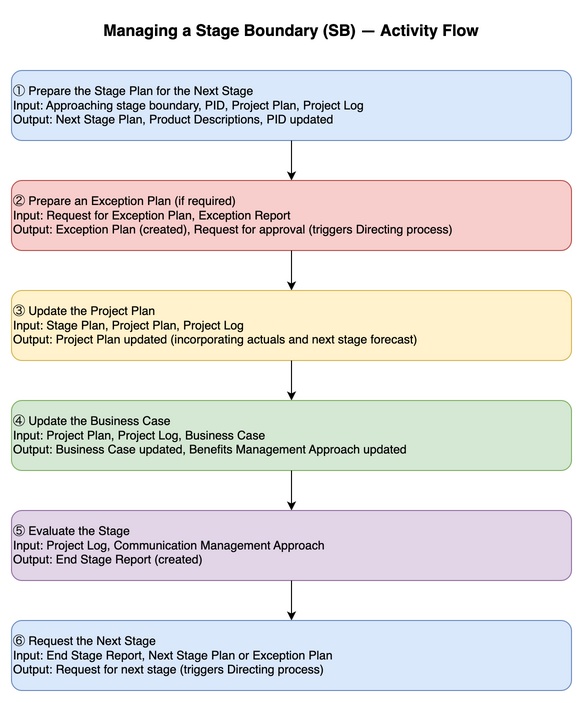
| Input | Activity | Output |
|---|---|---|
| Approaching stage boundary (trigger), PID, Project Plan, Project Log | Prepare the Stage Plan for the Next Stage | Project Log (updated), Stage Plan (created for next stage), Product Descriptions (created), PID (updated as needed) |
| Request for Exception Plan (trigger), Exception Report, PID, Project Plan, Project Log | Prepare an Exception Plan (if required) | Project Log (updated), Exception Plan (created), Product Descriptions (created/updated), Request for Exception Plan approval (triggers DP) |
| Project Log, Stage Plan, Project Plan | Update the Project Plan | Project Plan (updated as needed) |
| Project Plan, Project Log, Business Case | Update the Business Case | Benefits Management Approach (updated as needed), Business Case (updated as needed) |
| Project Log, Communication Management Approach | Evaluate the Stage | End Stage Report (created) |
| End Stage Report, Stage Plan or Exception Plan (for next stage) | Request the Next Stage | Request for next stage (triggers DP) |
Activity Details
1. Prepare the Stage Plan for the Next Stage
As the current stage nears its end, create the Stage Plan for the next stage.
Note: Closure activities are planned as part of the Stage Plan for the final stage.
Planning is not a solo activity. It is necessary to consult with the Project Board, Project Assurance, Team Managers, and other stakeholders.
Recommended actions:
- Review PID components and update as needed
- Check the Lessons Log for lessons applicable to the next stage
- Review the Project Plan for milestones applicable to the stage
- Create the Stage Plan for the next stage
- Create Product Descriptions for products to be delivered in the next stage
- Create or update records in the Product Register for products planned for the next stage
- Update the Project Log when new issues or risks are identified
- Update the Quality Register for planned quality management activities (including target review and approval dates for products)
2. Prepare an Exception Plan (if required)
Applied when a deviation beyond agreed tolerances is forecast for a stage or project.
- Project Board approval ceases to be valid
- The Exception Plan is created before the planned stage boundary, but Project Board approval becomes the stage boundary for the revised stage
Recommended actions:
- Update the Project Log to record the Project Board’s request for an Exception Plan
- Review (and update as needed) the PID
- Check the Lessons Log for lessons applicable to the Exception Plan
- Review the Project Plan for milestones applicable to the Exception Plan
- Create the Exception Plan
- Create or update Product Descriptions for products to be delivered in the next stage
- Create or update records in the Product Register for products created by the Exception Plan
- Update the Project Log
3. Update the Project Plan
The Project Board measures progress against the Project Plan throughout the project.
Updates include:
- Update to reflect progress made in the stage being ended
- Forecast durations and costs from the Stage Plan or Exception Plan for the stage being started
- Details about cost or end-date revisions are used when updating the Business Case
Recommended actions:
- Confirm the current Stage Plan is up to date and update as needed
- Revise the Project Plan
- Update the Project Log if new issues or risks are identified
4. Update the Business Case
Projects are not carried out in a peaceful environment — the Business Case changes alongside changes in the external environment.
The Project Executive bears accountability for the Business Case, so the Project Manager works in consultation with the Project Executive.
Recommended actions:
- Confirm whether there have been changes to the relevant organisation’s risk appetite and risk capacity
- Use the Project Log to assess project risks and identify key risks affecting the Business Case
- Update the Benefits Management Approach to reflect the results of benefit management actions carried out in the stage
- Confirm in the Project Plan whether the project’s planned completion date has changed (may affect expected benefits)
- Revise the Business Case and, where necessary, the Benefits Management Approach to obtain Project Board approval
5. Evaluate the Stage
Report stage outcomes to the Project Board so that the project management team has a clear picture of progress.
PM’s role:
- Provide opinion on whether the project continues to have the capability to meet the Project Plan and Business Case
- Assess the overall risk situation
- Carry out as close as possible to the actual stage end
Recommended actions:
- Prepare the End Stage Report using the updated Business Case, Project Plan, Project Log, and management approaches based on stage performance
- Review recorded lessons and include them in the End Stage Report (particularly important for long projects)
- Review the Communication Management Approach to confirm distribution requirements to external parties
6. Request the Next Stage
The Project Manager contacts the Project Board to request closure of the current stage and progression to the next.
Recommended actions:
- Brief the Project Board on current stage performance, an outline of the next stage, and required personnel and resources
- Confirm any areas of conditional approval for off-specifications
- Request Project Board approval for the Exception Plan or Stage Plan (and revised Project Plan, Business Case, etc.)
- Request authority from the Project Board to deliver the next stage
- Review lessons where appropriate
Applying the Process
General Considerations
- Activities of this process can be combined, split, or run concurrently according to the situation
- Ensure the integrity of the connection with the Starting Up a Project, Controlling a Stage, and Directing a Project processes
Tailoring Roles
- The Project Manager bears responsibility for creating all new management products, but when bearing overall accountability, can delegate work to Project Support, Team Managers, etc.
Responsibilities
| Activity | Business Layer | Project Executive | Senior User | Senior Supplier | Project Manager |
|---|---|---|---|---|---|
| Prepare the Stage Plan for the Next Stage | — | A | C | C | R |
| Prepare an Exception Plan (if required) | — | A | C | C | R |
| Update the Project Plan | — | A | C | C | R |
| Update the Business Case | — | A | C | C | R |
| Evaluate the Stage | — | A | C | C | R |
| Request the Next Stage | — | A | C | C | R |
R = Responsible, A = Accountable, C = Consulted
Applying Practices to the Process
| Practice | Application |
|---|---|
| Business Case | Stage-end performance is evaluated, and changes to projected costs, risks, and benefits are reflected. The Benefits Management Approach and Sustainability Management Approach are updated as needed |
| Organising | Project team performance and wellbeing are reviewed as inputs to lessons and the End Stage Report. Each management approach is updated as needed |
| Plans | Stage-end performance is evaluated; the Project Plan is updated to reflect changes to scope and timing. The next Stage Plan or Exception Plan is created |
| Quality | The Quality Register is checked to confirm required quality activities have been completed. Product Descriptions for the next Stage Plan are created |
| Risk | The Risk Register is cleared of current stage risks; risks for the next stage are added and updated |
| Issues | The Issue Register is cleared of current stage issues; issues for the next stage are added and updated |
| Progress | The Product Register confirms required products have been delivered. The End Stage Report is created and issued |
If you enjoyed this, leave a comment~