Summarizes the PRINCE2 progress practice, focusing on stages, tolerances, exception management, and reporting.
Progress
The purpose of the PRINCE2 progress practice is to monitor actual achievement against the plan, forecast continued viability, and control deviations that exceed tolerances.
Core Definitions
Term
Definition
Progress
A measure of actual achievement against planned targets
Forecast
A projection derived by analysing historical data and past performance patterns
Exception
A situation in which a deviation exceeding the agreed tolerance between the Project Manager and the Project Board is expected to occur
Guidance for Progress Management
Define management levels and tolerances
Apply two types of controls (event-based or time-based)
Review and report progress and lessons
Forecast remaining work and escalate
Use data
1. Management Levels and Tolerances
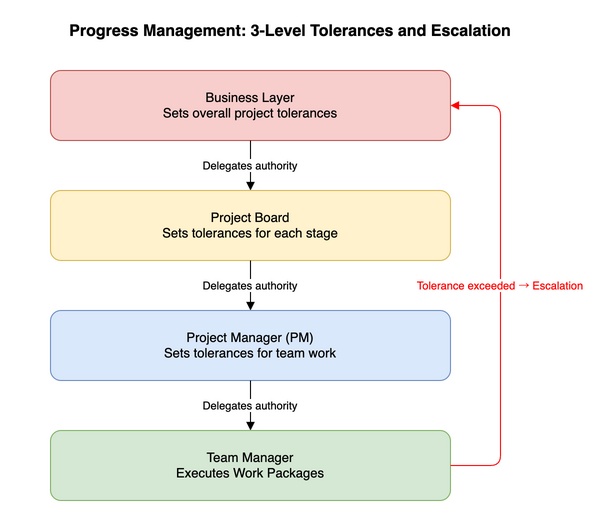
Progress management: three-layer tolerances and escalation
Projects are managed through three layers, each accountable within its assigned tolerances.
Business Layer (outside the project): Sets overall requirements and project-level tolerances.
Project Board (directing): Responsible for project-level control. Assigns stage tolerances to the Project Manager and decides whether to continue. Reports to the Business Layer when tolerances are forecast to be exceeded.
Project Manager (managing): Responsible for day-to-day stage management. Escalates to the Project Board via an Exception Report when stage tolerances are forecast to be exceeded.
Team Manager (delivering): Controls Work Packages within agreed tolerances. Raises an issue to notify the Project Manager when WP tolerances are forecast to be exceeded.
Tolerance Matrix
Tolerance Area
Project Level
Stage Level
WP Level
Product Level
Benefits
Business Case
Stage Plan
—
—
Time
Project Plan
Stage Plan
WP Description
—
Cost
Project Plan
Stage Plan
WP Description
—
Quality
Project Product Description
—
—
Product Description
Scope
Project Plan
Stage Plan
WP Description
—
Sustainability
Business Case
Stage Plan
WP Description
Product Description
Risk
Business Case
Stage Plan
WP Description
—
2. Types of Control
Throughout the project lifecycle, two types of progress control are provided: event-based and time-based.
Activity
Control Type
Notes
Monitoring
Time-based activity
Conducted as regular status checks
Control (decision-making)
Event-based activity
Decisions made when needed
Reporting
Both time and event
Regular reports plus event-triggered reports
Appropriate use of event-based controls allows the project management team to hold meetings and make decisions only when most needed, improving efficiency.
3. Reviewing Progress and Lessons
Regular reviews: The Project Manager uses Checkpoint Reports to review progress and manages the Project Log.
Logs and registers:
Daily Log: Records small actions and informal issues, notes, and observations. Accumulated entries help uncover new risks and issues.
Issue Register: Records formal issues with significant project impact for open monitoring and review.
Product Register: Manages product status (pending, in progress, complete).
Lessons management: Actively captures and promotes learning from experience for this and future projects.
5 questions for lessons analysis: Expected (what was expected) → Actual (what happened) → Success (what worked) → Failure (what didn’t work) → Improvement (what to do differently next time).
4. Reporting Progress and Lessons
Report
From/To
Type
Main Purpose
Checkpoint Report
Team Manager → Project Manager
Time-based
Report team plan progress and status updates
Highlight Report
Project Manager → Project Board
Time-based
Report project and stage progress and status updates
Lessons Report
Situation-dependent
Event/time
Provide detailed lessons review for a specific lesson, stage, or the whole project
Issue Report
Situation-dependent
Event-based
Enable formal review and response to change requests, off-specifications, business opportunities, or problems
Exception Report
Project Manager → Project Board
Event-based
Report forecast tolerance breach and seek Project Board direction
End Stage Report
Project Manager → Project Board
Event-based
Report stage performance and request authorisation to proceed to the next stage
End Project Report
Project Manager → Project Board
Event-based
Report overall performance and follow-on recommendations and request project closure
5. Forecasting
Early response: Rather than waiting for a deviation to occur, responding as soon as it is forecast is essential for ensuring project success.
Multi-dimensional view: Consider all seven performance targets, not just time and cost.
Data analysis and systems: When managed via an integrated system, What-if scenario simulation becomes possible, reducing the Project Manager’s forecasting burden.
6. Escalating
Based on progress reviews, determine whether plans at each level remain within agreed tolerances. Situations forecast to exceed tolerances are exceptions and require reporting to a higher management level.
Work Package level exception: When a Team Manager forecasts a tolerance breach, they raise an issue to notify the Project Manager, who advises on corrective action.
Stage level exception: When a stage tolerance breach is forecast, the Project Manager creates an Issue Report and then submits an Exception Report to the Project Board. The Project Board may instruct the PM to create an Exception Plan, remove the cause, reset tolerances, or take time for further consideration.
Project level exception: If a breach of project-level tolerances is forecast, the Project Board loses authority to direct the project and must escalate the decision to the Business Layer.
Supporting Techniques
Dashboard: Presents large volumes of decision-support information at an aggregated level using visual formats such as charts and traffic lights.
Daily stand-up: A short daily meeting. Progress and obstacles are shared using three guiding questions: “What did you do yesterday?”, “What will you do today?”, “Are there any problems or issues?”
Earned Value Management (EVM): Integrates scope, schedule, and cost to create a baseline for comparison. Used for objective historical assessment and future forecasting.
Peer review: An assessment of the project by someone with project management experience from outside the project management team.
Burn chart: Visualises progress using a line graph showing work completed and remaining. Commonly used in agile development.
Burn-down chart: Shows remaining work. Helps identify estimation issues early and understand remaining effort.
Burn-up chart: Shows completed work. Helps motivate the team.
Retrospective: A progress review focused on how the team is working rather than what has been produced. Keys to success: an independent facilitator, appropriate participants, visual tools, and focus on a small number of actionable items.
Kanban board: A visual management system that limits work in progress (WIP) and visualises the flow of work. Bottlenecks and obstacles can be identified visually and immediately.
Management Products Supporting the Practice
Digital and Data Management Approach (part of Project Initiation Documentation)
Purpose: Describe how digital technology will be used to support project management and project work, and how data and information will be created, used, and managed.
Daily Log (part of the Project Log)
Purpose: Record informal issues, required actions, or significant events not covered by other PRINCE2 management products.
Lessons Log (part of the Project Log)
Purpose: Provide a repository for recording lessons applicable to the current or future projects.
Checkpoint Report
Purpose: Report the status of a Work Package to the Project Manager at the frequency defined in the Work Package.
Highlight Report
Purpose: Provide the Project Board with a summary of stage status at defined intervals.
Exception Report
Purpose: Notify the Project Board when a Stage Plan or Project Plan is forecast to exceed set tolerances, and provide options and recommendations for how to proceed.
End Stage Report
Purpose: Convey sufficient information to enable the Project Board to decide what to do next, including a summary of progress to date and the overall project status.
End Project Report
Purpose: Review how the project performed against the version of the Project Initiation Documentation used to authorise the project.
Key Roles and Responsibilities
Role
Key responsibilities
Business Layer
Set project tolerances and document in the project mandate. Provide Business Layer reporting requirements and standards. Make decisions on Exception Reports when project-level tolerances are forecast to be exceeded
Project Executive
Set stage tolerances. Approve the Digital and Data Management Approach from a business perspective. Make decisions on Exception Reports when stage-level tolerances are forecast to be exceeded. Recommend to the Business Layer when project tolerances are forecast to be exceeded
Senior User
Agree to the Digital and Data Management Approach from a user perspective. Ensure consistent progress towards outcomes from a user perspective
Senior Supplier
Agree to the Digital and Data Management Approach from a supplier perspective. Ensure consistent progress towards outcomes from a supplier perspective
Project Manager
Develop and maintain the Digital and Data Management Approach. Authorise Work Packages and set tolerances. Establish and maintain the Project Log. Monitor progress against the Stage Plan. Create all required reports
Team Manager
Agree Work Packages with the Project Manager. Create Checkpoint Reports. Notify the Project Manager when WP tolerance deviations are forecast
Project Assurance
Advise the Project Manager on the Digital and Data Management Approach. Confirm stage and project progress against agreed tolerances
Project Support
Manage specialist tools supporting the Digital and Data Management Approach. Support compiling, distributing, and storing reports. Maintain the Project Log
Key Relationships with Principles
Principle
How achieved
Result
Ensure continued business justification
Confirm Business Case viability when regularly reviewing progress at stage boundaries and exceptions
Better decisions about the ongoing viability of the project
Manage by stages
Divide the project into stages and authorise one stage at a time
Project delivered in more manageable chunks; finer control over project resources
Manage by exception
Set tolerances and manage by exception against those tolerances
More event-based control; exceptions escalated to the next management level when tolerances are forecast to be exceeded
Tailor to suit the project
Set tolerances and controls appropriate to the project’s risk, complexity, and size
Appropriate level of progress management, monitoring, and control for the project’s risk, complexity, and size


If you enjoyed this, leave a comment~